Infor & DSW Co-Dev
Complete In-Store Experience
A single solution that simplifies the entire in-store experience for both DSW store employees and their customers.
Categories
Enterprise
Service Design
Mobile
Point of Sale
Inventory Management
Task Management
Role
Product Designer
Company
Infor

Project Overview
Together with co-dev partner Designer Shoe Warehouse's "Transformation Team", a hand-picked team of 3 product designers (myself included), designed a mobile solution concept for the iPad that not only simplifies the end-to-end operational processes of running the "brick and mortar" store, but is also personal and engaging for DSW employees and their customers.
Goal
Our goal was to examine DSW's store operations holistically, and transform their processes with an application that feels personal, is easy to use, with greater efficiency.
Challenges
The main challenge was to design an application tailored to a single customer's needs, but also consider how it can be leveraged for the development of a general solution afterwards.
On top of that, everyone on this team had been working on in-house Infor products. This was the first time where we were required to function more like an agency, without the familiar in-house product development process, and a VERY abbreviated time frame.
Time Frame
We had 8 weeks (broken into 4 sprints) to complete everything from the initial research, to the delivery of tried and tested hi-fi designs.

Process

Observations
In order to walk that mile in the user's shoes, we visited some of DSW's busiest store locations right here in NYC.

Walking through every process from the back office, through the stock room and the sales floor, we were able to take it all in and document the user's pain points. We then set time aside to interview different employee roles to get a grasp on each of their needs.

We also got a look at the current set of tools the DSW store employees are working with. Terrible interfaces on software that is out-dated and crashes constantly. Worst of all, none of these tools communicate with each other. What a nightmare!
Workshops
After the store visits and user-interviews we had a basic understanding of the store processes, and how they work. The next step was to understand why.
Enlisting the help of DSW's Transformation Team, a series of workshops were conducted where we discussed the details behind every process, and performed multiple sorting and logic exercises to best distill the reason behind them all.

In one exercise we listed every process and sorted them into separate categories, defined by what the general purpose of said process is (ie. inventory management, scheduling, customer interaction, etc.)
Without a clue on how a DSW store is run, we had a lot to learn in very little time. After reaching out to our partners on the DSW Transformation Team, we scheduled a series of store visits, user interviews, and all-day workshops. A true hands-on crash course on every single process involved in their stores.
Research

Lets make sense of this mess
Synthesis
After all the store visits, user interviews, and workshops, we were feeling a bit overwhelmed with the amount of information that we gathered. How do we make sense of it all?
Insights
Understanding how the processes work and why they are in place, we realized they each fall into one of the following three categories:

Ideas
With the insight for the structure of the solution established, we now needed ideas on to how to solve the many specific problems for each different user type, and sort which would make the most positive impact for them.
For this we came up with a Persona for each user type:
click or tap on persona to view full profile


We then analyzed all our notes and data from the research and categorized them by user type. Then we can cross reference the pain points of each user and see where the similarities lie and identify new opportunities.
We identified 5 main problem areas which we will focus on solving:
-
Trying to find shoes is difficult for both the associate and the customer
-
Solving any customer's issue requires multiple tools and steps
-
Stores lack actionable information and visibility into the inventory pipeline
-
Repeatable processes are not automated
-
We can not anticipate customer needs or wants

Requirements
Our next step was to define the exact requirements for our product. Due to the many restrictions in time and budget, we couldn't design something that can do EVERYTHING for EVERYONE, so what did we absolutely need to solve for?

Together with the DSW team, we listed all the user stories we could think of (i.e Hannah can look up Maya's profile by inputting Maya's phone number), and implemented "sticker voting" to sort them according to their level of impact against the 5 problem areas mentioned earlier.
Features
We then listed every feature that we needed to design for. Considering how quickly we had to deliver on this project, planning and coordination was key.

Grouping the features according to where they fall in the "Sell It, Move It, Run It" structure, we divided them between the team. We worked on these feature sets seperately, but we had to make sure it was all part of a uniform experience.
Flows
At this stage I was in charge of all the inventory management flows, or the "Move It" part of the app. This involves managing inventory shipments coming in and out of the store, as well as the exact location of the inventory items within the store.
First I sorted every process into those two highest levels:
-
Inventory items locations within the store
-
Inventory shipments moving into and out of the store
Every task within "Move It" falls under one of those two levels, making that the first step in every flow.
Then I analyzed each process again and sorted them by what the user wants to accomplish in this task on a general level, for example:
-
Is the user searching for something?
-
Does the user want to create something new?
-
Does the user want to edit something?
This becomes the next step in the flow, and so on forming the overall architecture of the application.
Next I'm going to focus on 2 identical user story flows as examples (one from the location management side, and one from the inventory management side):
-
"Julie can check on the locations of all the shoe styles with low inventory (5 or less items) and any empty spaces on the sales floor, in order to plan for an upcoming shipment."
-
"Julie can check if a specific shoe style is in a shipment already on it's way to the store."


The foundation is set,
now we build upwards
Architecture
The foundation was set, and the plan was approved. It was time to start working on the tangibles and build this thing up.
Navigation
We'd already established the entire experience is organized into 3 sections ("Sell It", "Move It" and "Run It), which will be top level of our navigation. Since I focused most of my efforts on the "Move It", I'm going to continue with that as the example (again, this section deals with inventory management).
"Move It" is also divided into 2 sections:
1. Location Management
2. Shipments/Transfers
The two sections have different organizational structures. Managing the locations of items in a physical space requires a solution that accounts for a horizontal organizational structure. Below is the path to completing the "Location" task from the flow above for example:

Notice how the user can take multiple actions at every level. Now compare that to the structure of the path for completing the "Inventory" task below (and remember they both had identical flows!):

Managing the shipments of inventory coming in and out of the store required a guided and vertical organizational approach. The user's choices are usually binary or in some cases as simple as continue forward or back up.
Layout
Having two different organizational structures means we have two different layouts. Location management, with it's broad horizontal structure and modeling for an actual physical space, required a visual representation of that physical space. A map environment which the user interacts with to complete their task.


The vertical structure of the Shipments/Transfers, with it's linear progression called for a very different interface layout. A nesting of lists of all the shipments and what's in those shipments.


Protyping
Previously our product design team worked by creating detailed and annotated low fidelity wireframes, followed by testing those with the user until it was finally ready for the visual interface design. This was the first project at Infor where we implemented an Agile design process to designing a prototype. We designed the look and the experience simultaneously, and refining the overall solution one iteration at a time.
Iteration
To get the proper feedback from stakeholders who were serving as subject matter experts from DSW, meetings were held towards the end of each day to share our progress and make sure that we're taking all the requirements and nuances of the day to day of our users into consideration.

Printing out our designed flows, we'd put them up in sequence and walk through the experience and interface with everyone involved. Then, applied any relevant feedback to improve the work flow until it was complete.
Interactions
In these meetings, the team would also cross-reference our designs to make sure the interactions and elements used in the interface were uniform across the experience. We kept a working file that documented each of the elements used, so when an element was updated everyone on the team could reference it.
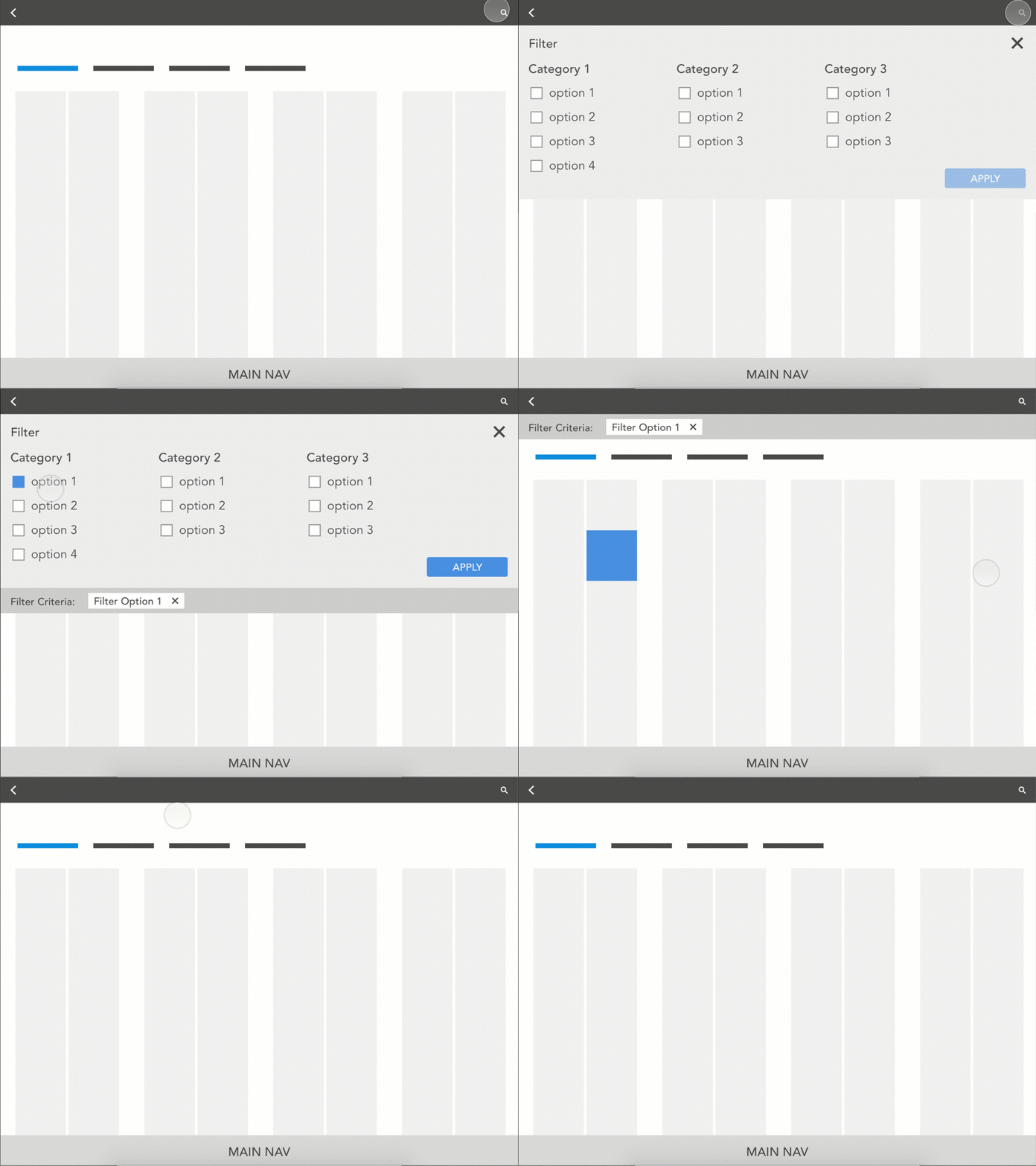
To best communicate the interactions with the other stakeholders, the team and I used the prototyping tool Principle. This allowed us to show them our different ideas for interactions and animations without the need of a single line of code.
Below is an example of the basic interactions for using the search/filter feature within the location management area of the solution.

The big pitch!
Delivery
It was finally time to put it all together and make this experience come to life. With a polished animated "click-through" prototype, we wanted to simulate a store manager and associate completing a selection of tasks that showcase our overall experience.
Pitch
The moment of truth was upon us so to speak, it was time to present the full experience to DSW's leadership team and executives to decide whether to go forward with development. Two team members volunteered to play the roles of Julie the store manager and Hannah the sales associate as I narrated the set up of these different scenarios.
Below is a capture of a few of the workflows completed by Hannah the sales associate interacting with Maya the customer:

Development

SUCCESS!!!
The DSW leadership team and executives were impressed with the experience we designed and went ahead to sign the deal with Infor to fully develop our solution.

